Frequently asked questions
FAQs
NDIS Plan Management
What is the NDIS?
The National Disability Insurance Scheme (NDIS) is a government initiative that provides support to eligible people with intellectual, physical, sensory, cognitive and psychosocial disability, and their parents and carers. Read more about the NDIS here.
What is the NDIA?
The National Disability Insurance Agency (NDIA) is the agency that implements the National Disability Insurance Scheme (NDIS)
Am I eligible for the NDIS?
There are a number of criteria to meet in order to be eligible for NDIS funding – including your age, Australian residency and the nature of your disability. To determine if you are eligible for NDIS funding, simply answer a few questions from the NDIS Eligibility Checklist
What is Plan Management?
Plan management means that a plan management provider of your choice will assist you in managing your NDIS plan funds. You will receive funds for Plan Management in your NDIS plan. This funding cannot be used for anything else.
Is there any cost to me to have a plan manager?
No, the NDIS pays for plan management under a separate area of funding in your plan. This will not impact funds used for other services in your budget.
How do I become Plan managed?
If you are new to NDIS you simply advise the NDIS Planner or Local Area Coordinator (LAC) during your Plan Meeting. Tell them you want to ‘endorse’ Plan Hero as your Plan Manager and you give them this information:
Plan Hero Pty Ltd
Provider#: 4050079575
ABN: 43 641 197 659
I already have a plan manager, can I change to Plan Hero?
You sure can! You can switch plan managers at any timne!
You will first need to:
1. Contact the NDIS and let them know you want to choose Plan Hero as your Plan Manager.
2. Get in contact with our team and we will help you get started with Plan Hero
Read our step by step guide: How to change NDIS plan managers.
If I am plan managed, can I use unregistered NDIS providers?
Absolutely. The benefit of using Plan Hero is that you can use both registered and unregistered NDIS providers.


How NDIS Plan Management works
How do I sign myself up to Plan Hero?
Easy peasy, simply fill out our Participant Registration Form and our friendly team will be in touch within 24-48 hours. Be sure to check your emails (and junk inbox just incase)
I am a support coordinator - how do I sign my clients up with Plan Hero
We love working with support coordinators to help support their participants to achieve their goals and outcomes. We have a great understanding for the types of supports and services participants might use.
You can refer a client via our Referral Form, or assist your client to sign up with us online via our Participant Registration Form (or call 1300 599 770 and we can complete this over the phone)
Please note: only authorised representative, parent or guardian may complete the sign up process on behalf of a participant. We encourage you to assist your clients with the sign up process, and our team is always available to assist and support you with any queries.
I am a provider - how do I refer a client to Plan Hero?
You can refer a client using our Referral Form and our friendly team will reach out to your client via phone and/or email within 24-48 hours.
How do I send invoices to Plan Hero?
Invoices must be sent to us via email: invoices@planhero.com.au
They must also be an attachment to the email (for fastest processing).
How do I apply for reimbursements?
Reimbursements are invoices paid by YOU out of pocket. You can send the invoice you paid along with proof of your payment (receipt or bank account/card statement) to us via email: payme@planhero.com.au
What is included in the Service Agreement?
When signing up you will be provided with our Service Agreement and will be able to access a copy of it in your participant dashboard. This will outline our role as your plan manager, as well as both yours and our responsibilities and terms of our agreement.
Read more about what needs to be included in a service agreement here.
I have a new plan, what do I do?
You will need to send Plan Hero a copy of your new NDIS plan as soon as you are issued it, this way we can ensure you can access funding under the new plan.
Please contact our team via support@planhero.com.au or call 1300 599 770.
How do I authorise/approve invoices?
You can tell us if you want to manually approve every invoice or will opt for standing approval.
STANDING APPROVAL – This is the most common type of approval. Any invoice submitted will be carefully examined by our team and paid. You will be able to view all claims in our portal or phone app at any time, 24/7.
MANUAL APPROVAL – If you opt for manual approval, you will be required to approve each invoice as they are processed by us. You can do this via the portal, or via email/phone.
You will need to manually approve ALL invoices and if you don’t approve an invoice within 7 days, it will be assumed to be approved.
Note: If you upload the invoice, this will be considered approved as you have submitted it yourself.
Can I change my invoicing approval option?
Of course, simply send an email to our team at support@planhero.com.au or call 1300 599 770 and request to change your invoicing approval option.
The Plan Hero Portal
How do I sign up for the Plan Hero portal?
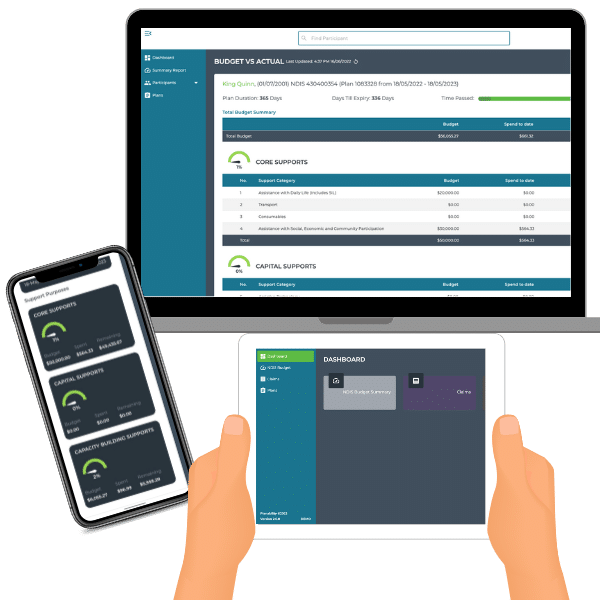
You must be a registered participant with Plan Hero prior to signing up for our Plan Hero app and participant dashboard. Once we have completed your registration, we will send you your log-in details for access to the Plan Hero Dashboard and the Plan Hero app.
My password doesn’t work/I forgot it – what do I do?
Do not worry, simply go to the log-in page and select ‘forgot password’. You will then be prompted to enter your email and you will be sent email instructions on how to reset your password. (Make sure you check your junk email too). If you are having any issues simply email support@planhero.com.au or call 1300 599 770, and we can assist with resetting your password
How do I allow someone else to access the portal on my behalf?
If you would like someone else such as a family member, your support coordinator, carer or another support to be able to access the portal to assist you with budgeting we just need your approval.
They will need to be set up as a seperate user and will have full access to view your budget, claims and funding details.
To give them access, simply email us at support@planhero.com.au or call 1300 599 770 to request access for other users (this can only be requested by the participant or their authorised representative)
I don’t understand how to use the Participant portal, what do I do?
Once you have access to our app, we will send you a manual explaining how to use your app. This will also be available on our help desk. There are different versions for web/desktop, phone access and for carers or support coordinator users. If you are still having difficulty, contact our team on support@planhero.com.au or call 1300 599 770 and we can guide you through using the portal
Do you have a Phone App?
Once you have access to our app, we will send you a manual explaining how to use your app. This will also be available on our help desk. There are different versions for web/desktop, phone access and for carers or support coordinator users. If you are still having difficulty, contact our team on support@planhero.com.au or call 1300 599 770 and we can guide you through using the portal
Chat to the team